This page applies to SPT version
4.0
¶ Github tracked issues
- Some quests need PMCs to spawn in map locations with no bot spawns, making them impossible to complete (e.g. kill x PMCs in scav fortress/base).
- Selecting the overview tab as a scav can break your client, Alt + F4 to revert the raid.
- Your active flea offers are marked as expired when the server is offline and items are returned in the mail.
- Flea categories don’t always show the correct number of offers when filtering by item.
- The server will not load when placed in a folder path containing certain unicode characters (Japanese and Korean characters especially).
- Looting a PMC dogtag doesn’t always show their name on the post-raid kill screen.
- Insured quest items that are consumed in a quest can be returned to the player.
- Failed quests that’re restarted retain their task completion status until client is restarted (e.g.
Bullshit- Shooting a scav after collecting the flash drive results in that task remaining completed). - Using a low hp medpack while extracting can result in a 0 resource item being left in your inventory.
- Lightkeeper does not give rewards in-game, they are sent by mail.
- The bitcoin counter in hideout is slightly desynced to your game client, your game will say a bitcoin is ready to collect but the server is ~5 minutes behind.
- Replacing a daily/weekly quest with another from the same trader will cause a client soft lock, restarting the client fixes the issue.
¶ The server has unexpectedly stopped… : Decoded string is not a valid IDN name.
Remove any trailing symbols from your PC’s name (e.g.: My-PC- > My-PC).
The 15th character of your PC name can’t be a symbol either.
Your PC name should also not use any special characters. Only a-z, A-Z, 0-9 and - are valid (e.g.: My-PÇ > My-PC).
You can rename your PC by searching for View your PC name in the Start menu, and clicking on Rename this PC.
¶ Server mods don’t appear in the SPT Launcher
Update your SPT.
Note that Client mods won’t show up in the SPT Server nor Launcher.
¶ There are little to no PMCs in your Scav runs
Update your SPT, and make sure you don’t have an extended raid timer, as EFT’s spawning system tends to break with them.
¶ Empty flea with 404 not found errors
¶ Server doesn’t launch or closes immediately
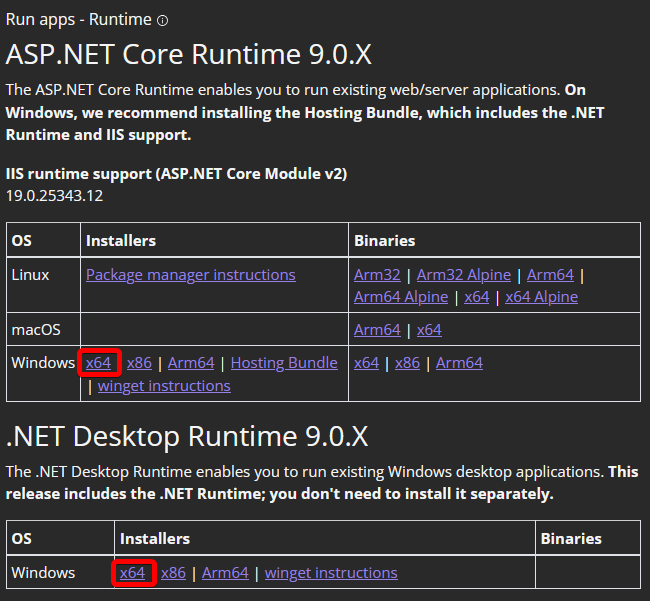
From here download the latest version of both:
ASP.NET.NET Desktop Runtime
If it tells you that you already have them installed, then use the repair option. Restart your PC after.
¶ Kollontay still spawns on high level Ground Zero
¶ Crisis does not unlock new crafts
¶ SPT Launcher doesn’t do anything when you click Play
¶ Not a valid Win32 FileTime when using the Hijri calendar
¶ Festive Airdrops have no loot
No known fix.